
The Subcold ROAM range features a digital touch control panel that allows you to switch the appliance on and off, set the temperature, select cooling modes, manage battery protection, and access additional functions.
The controls differ slightly between the ROAM 20/30 and the ROAM 45DZ, so please follow the instructions for your specific model.
ROAM 20 / ROAM 30 Control Panel
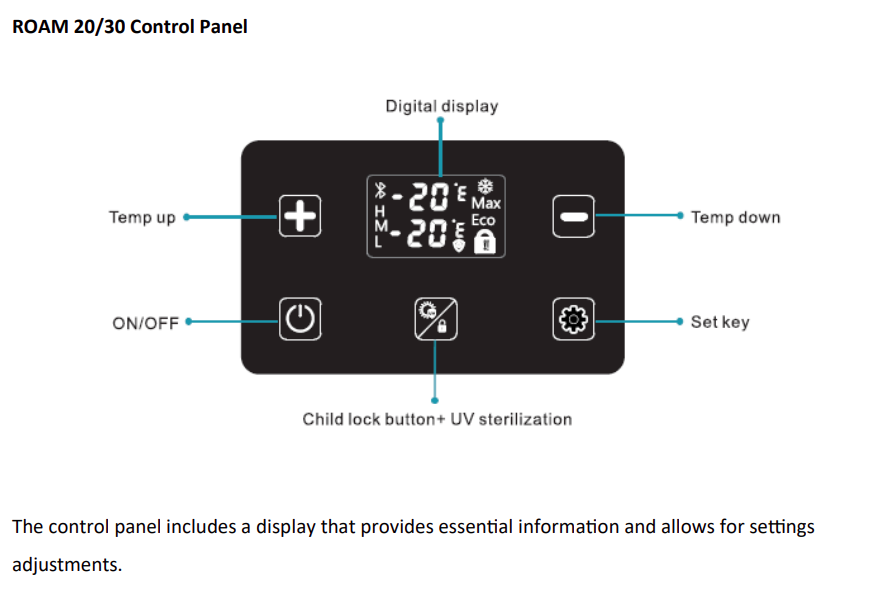
The ROAM 20 and ROAM 30 control panel includes:
Temperature Up (+)
Temperature Down (-)
Power On/Off
Child Lock / UV Sterilisation button
Set button
Digital temperature display
The control panel also has an automatic child-lock function to help prevent accidental changes to the settings.
Switching the ROAM 20/30 On
Connect the fridge to a suitable power supply.
When the appliance is in standby mode, OFF will appear on the display when the controls are touched.
Press and hold the Power button for approximately 3 seconds.
The appliance will begin its start-up process.
There is a normal start-up delay of approximately 1 minute.
The compressor will then begin operating.
The one-minute delay before the compressor starts is normal and does not indicate a fault.
Switching the ROAM 20/30 Off
Make sure the control panel is unlocked.
Press and hold the Power button for approximately 3 seconds to switch the appliance off.
Unlocking the Control Panel
The control panel automatically locks to prevent accidental operation.
When the controls are locked, a padlock symbol will appear in the lower-right corner of the display.
Press and hold the Child Lock button for approximately 3 seconds to unlock the panel.
If no buttons are pressed for approximately 20 seconds, the controls will automatically lock again.
Setting the Temperature
Make sure the control panel is unlocked before changing the temperature.
Press + to increase the temperature and - to decrease it.
Each press changes the setting by 1°C.
Press and hold either button to move through the temperature range more quickly.
The temperature setting will flash while it is being adjusted.
After approximately 5 seconds without any further changes, the setting is saved automatically.
The ROAM can be set between approximately +20°C and -20°C, allowing it to be used for refrigeration or freezing.
ECO and MAX Cooling Modes
ECO is designed for normal refrigeration and maintaining an already cooled temperature while reducing energy consumption.
MAX provides faster cooling and is useful when the fridge has just been switched on, a lower temperature is required quickly, or a large number of items have recently been added.
To switch modes, unlock the control panel and press the Set button. The display will change between ECO and MAX.
For general use, ECO mode is normally suitable once the required temperature has been reached.
Changing Between Celsius and Fahrenheit
Unlock the control panel.
Press and hold the Set button for approximately 2 seconds.
The temperature unit symbol will begin flashing.
Use the + or - button to switch between °C and °F.
Using the UV Sterilisation Function
Unlock the control panel.
Press the Child Lock / UV button once to activate the UV lamp.
For safety, the UV light automatically switches off when the fridge lid is opened.
Important: Do not look directly at the UV light, as ultraviolet light can be harmful to the eyes.
Battery Protection Settings
When the ROAM is powered from a vehicle, the built-in low-voltage protection system helps prevent excessive discharge of the vehicle battery.
If the voltage falls below the selected protection level, the compressor will stop automatically and E1 will appear on the display.
The fridge will resume operation automatically when the voltage returns to a suitable level.
The factory default setting is M - Medium.
To change it: unlock the control panel, press and hold Set for approximately 2 seconds, press Set briefly again, then use + / - to choose L, M or H.
ROAM 45DZ Control Panel
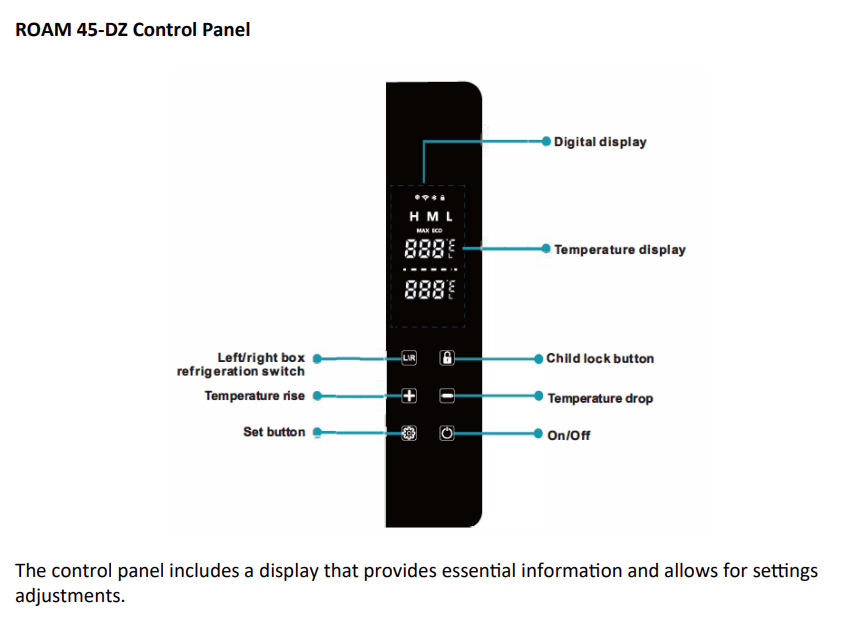
The ROAM 45DZ uses a slightly different control panel because it contains two independently controlled temperature zones.
Left / Right Zone selector
Temperature Up (+)
Temperature Down (-)
Set button
Child Lock button
Power On/Off
Dual temperature display
Switching the ROAM 45DZ On
Connect the appliance to a suitable power supply.
When the fridge is in standby mode, OFF will appear on the display when the controls are touched.
Press and hold the Power button for approximately 3 seconds.
There will be a normal delay of approximately 1 minute before the compressor begins operating.
Switching the ROAM 45DZ Off
Make sure the control panel is unlocked.
Press and hold the Power button for approximately 3 seconds to switch the entire appliance off.
Locking and Unlocking the Controls
Press and hold the Child Lock button for approximately 3 seconds to change the lock status.
The padlock symbol indicates when the control panel is locked.
The controls automatically lock again after approximately 20 seconds of inactivity.
Selecting the Left or Right Compartment
Before changing the temperature, select which compartment you want to adjust.
Press the L/R button to switch between L - Left compartment and R - Right compartment.
The selected zone will flash on the display.
Setting the Temperature
Once the required compartment is selected, press + to increase the temperature or - to decrease it.
Each press changes the setting by 1 degree.
Hold either button to adjust the temperature more quickly.
After approximately 5 seconds, the setting will save automatically.
The two compartments can be set to different temperatures, for example one for chilled items and one for frozen products.
ECO and MAX Cooling Modes
MAX is used when you want the appliance to cool down as quickly as possible.
ECO is for normal operation and maintaining an established temperature while reducing energy consumption.
To change mode, unlock the panel and press the Set button.
Switching One Compartment Off
The ROAM 45DZ allows either the left or right compartment to be switched off when it is not required.
Both compartments cannot be switched off at the same time using the individual zone controls.
Select the L or R zone with the L/R button, then press the Power button. The selected zone will display OFF.
Press the Power button again while that zone is selected to reactivate it.
Battery Protection Settings
The ROAM 45DZ includes low-voltage battery protection when powered from a vehicle.
If the supply voltage drops below the selected level, the compressor will stop and an E1 warning will appear.
The fridge will automatically resume operation when the voltage returns to an acceptable level.
The factory setting is M - Medium.
To change it: unlock the panel, press and hold Set for approximately 3 seconds until you hear a tone, press Set briefly again, then use + / - to select L, M or H.
What Do L, M and H Battery Settings Mean?
L - Low Protection allows the battery voltage to fall further before the fridge switches off.
M - Medium Protection provides a balance between fridge operation and battery protection and is the factory default.
H - High Protection switches the fridge off sooner to help preserve more vehicle battery power.
The manual recommends H when operating the fridge from a vehicle to help ensure enough battery power remains to start the vehicle.
If the Control Panel Is Not Responding
First check whether the padlock symbol is showing on the display.
The controls automatically lock after approximately 20 seconds, so this is often why the buttons appear unresponsive.
Unlock the control panel before trying to change temperature, ECO/MAX mode, battery protection, temperature zones, or the UV function.
If E1 Appears on the Display
An E1 error normally means the fridge has activated its low-voltage battery protection.
Check the vehicle battery voltage, the 12V/24V power connection, the power cable, and the selected L/M/H protection level.
If the power supply returns to the required voltage, the appliance should automatically resume operation.
Quick Guide - ROAM 20/30
Hold Power for 3 seconds: Switch appliance on/off
+ / -: Adjust temperature
Hold Child Lock for 3 seconds: Unlock controls
Press Child Lock / UV once: Activate UV sterilisation
Press Set: Switch between ECO and MAX
Hold Set: Access °C/°F and battery protection settings
Quick Guide - ROAM 45DZ
Hold Power for 3 seconds: Switch entire appliance on/off
L/R: Select left or right compartment
+ / -: Adjust selected compartment temperature
Hold Child Lock for 3 seconds: Lock/unlock controls
Press Set: Switch between ECO and MAX
Power while L or R is selected: Switch that individual compartment on/off
Hold Set: Access battery protection settings
If you continue to experience problems with the control panel after following these instructions, please contact Subcold Customer Service with your model number, serial number, order details, and a photograph or video of the display.